


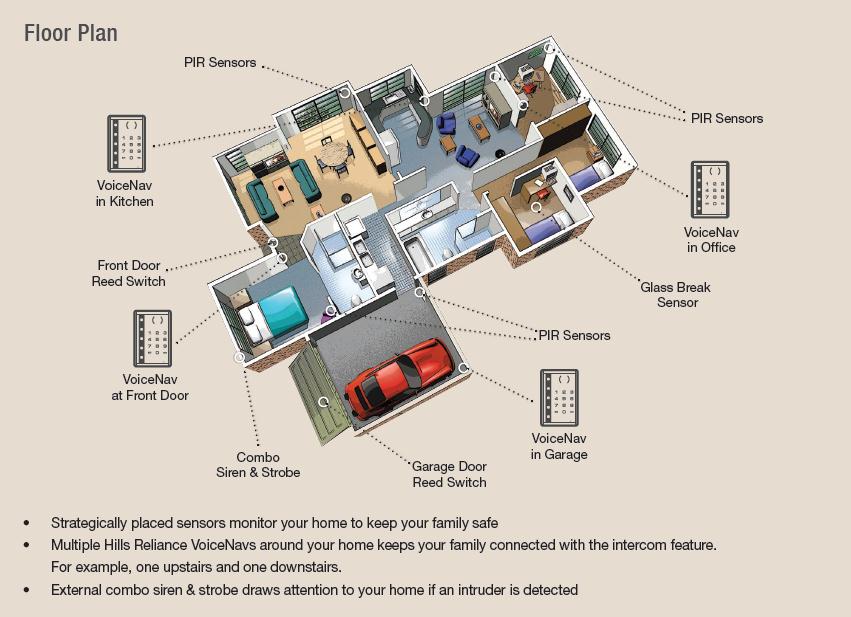
Planning the Type of Alarm required: The first planning decision, that is, whether to opt for a wired or wireless alarm system, will very much depend on the ability or otherwise, to easily cover, or hide any required cables. You may find the thought of white (or brown) cable trunking does not fit in with your newly decorated rooms etc. However, if you need to redecorate several rooms, or are going from emulsion to wallpaper, then those rooms where you need to run cables might lend themselves readily to a bit of drilling and channelling of cables. Remember, it is also easy to run the thin alarm cables down the door-frames, and you can cover them with moulding. SEE TIPS ON THIS LATER. The quarter circle wood strips can also have the inner corner planed off to make room for the cable underneath (TIP: you will NOT have room for cable clips behind a planed moulding, so you will have to fix the cable in place with a few dabs of super-glue or similar, then use thin panel pins to nail the moulding on to the door surround, taking care to avoid going through your cable!). At floor level, it will be best to run the cables under the floor-boards if you can. If not, you can then run the cable to the alarm control panel by making a small gap between the carpet underlay, and the INSIDE edge of the carpet gripper rod (take care to tape it so it does not move on to the top of the grippers otherwise it can get damaged), or in trunking as a last resort. If the thought of any of this cable-laying, and channelling puts you off, or you do not want to redecorate any re-plastered areas, then you will have to consider a WIRELESS ALARM SYSTEM. These can work out about 25-45% dearer than the wired equivalent, but the modern bell-boxes with SOLAR PANELS to keep the SAB battery charged up is a good idea. Obviously your layout plan (see below) may also dictate whether or not a fully wired system is possible. Planning the system layout: The most important step in installing your own alarm system is to plan correctly. This is normally done by drawing a floor plan of the building, then you need to decide what areas to cover with the alarm system: Main entry points, rooms, windows and vulnerable parts of the building. It is also a good idea to walk around the building and look for any vulnerable areas. From that information you can then decide what type of alarm panel and how many zones are needed. (Always try to pick an alarm panel with extra zones to allow for future expansion). Don’t forget that if your garage is linked to the house, it may be a good idea to have the garage door protected with a suitable contact, plus any other access door linked into the same zone When you have the main alarm areas (zones) of the system planned out, you can think about where to position the panel and/or remote keypad if used. You also need to decide where to mount the sensors and the neatest and easiest way to run the cables (AND mains power!) back to the panel. You also need to decide where to mount the bell box and internal sounders (if used). Most control panels will have one internal sounder or speaker included anyway. Other considerations: Should the main alarm panel (end station) be hidden just leaving a keypad on show? Using a system with an end station and remote keypad looks neater and is also more secure than leaving an alarm box on the wall in full view. If you have a suitable under-stairs cupboard, consider if it is suitable for getting mains wiring to it, and all the zone wires, and which can be hidden, and which can be drilled though the wall, and which will need to be clipped along skirting or laid inside trunking. If you are happy to use the panel with its own keypad, in a suitable cupboard (where it will then not be on view), then the remote keypad is not needed (unless you require an extra level of control, say from a bedroom). Bear in mind that you will need to run not only PIR and CONTACT sensor zones to the panel, but a wire will also have to run from the cupboard up the stairs, landing, then into the loft to reach the outside wall mounted bell-box. If you are lucky, you MIGHT be able to position the rear of the BELL-BOX over a corner hole in an air brick, thus saving a hole being drilled though your outside wall. DO NOT BE TEMPTED TO RUN A VISIBLE CABLE TO YOUR BELL-BOX Think about fitting a few 12 volt Smoke/Heat Detectors in suitable locations as part of the Alarm System. This will avoid the need to replace batteries in the stand-alone 9 volt ones PIR SENSORS:Try to mount the PIR’s in suitable positions to avoid false alarms from heaters, windows and post coming through the letterbox, etc. Central heating radiators are seldom a problem, but any CONVECTOR HEATERS will cause a lot of warm air movement that can trigger PIR’s if too close. Also, try to avoid pointing them towards the outside of a room, or into a bay window. Choose an appropriate corner of the room and point it towards the opposing corner. Mounting the sensors and Running cables: This part can be quite tricky, but it is very satisfying when it all comes together and it all works when completed! Mounting the sensors, speakers (if required), keypad, bell box, end station and drilling holes through walls for the cables. Think about how many cables will be running through a particular hole and therefore its diameter. Run a cable to each sensor leaving a good few inches to strip and terminate in case of any problems, at the other end (the end station) leave a good bit of slack and label the cable before you cut it off the cable drum! Remember that if you have more than one PIR or other sensor in a particular zone, you only need to have ONE CABLE to support that ONE ZONE. The PIR contacts should be looped in series (See below HERE), so if any ONE PIR in a 2 PIR zone activates, it will trigger that zone by opening the contact loop (NOTE: the tamper wiring should also be series wired). A single zone can have different sensor types connected to the one cable, via appropriate tamper-proof junction boxes, however, the downside is that if a fault develops or an alarm is triggered, you might not be able to find out which sensor was triggered (unless it has its own LED that stays lit when triggered, that is in the latching types). This really boils down to how many zones you have available on the panel you have chosen, and how many vulnerable rooms require more than the one sensor on that zone. Since PIR’s and door magnets use a similar sort of reed-switch, there is nothing wrong in wiring the switch contacts all in series for that single zone cable. Just remember that contacts and tamper loops will be a serial wired loop, but any +-12volt power pair will be parallel wired. Also think about the entry-exit zone. If you have a vulnerable room, for example a downstairs cloakroom/loo, that might have a window out of view where a burglar could work unseen (say in an entry, or next to the garage), then you could easily wire in an extra door magnet into this zone. It WILL mean that you will have to remember to close that door before you set the alarm, but it IS extra security, and will NOT use up an extra zone. Wiring detectors/bellbox/panel etc.: You do NOT need to be an expert at wiring or electronics to wire up an alarm panel, since most panels come with diagrams and instructions that are reasonably straightforward and easy to follow. You just need to be logical, and methodical, and possess a reasonable DIY and electrical knowledge. Note that you will be required to add a fused spur (NOT A SWITCHED SPUR!) into the plug circuit ring-main, to power the alarm panel. It is NOT a good idea to just use a convenient 13amp socket outlet, as someone might unplug it, or the chord might get pulled out! If you can get a feed direct form the consumer unit, this will be the cleanest feed (form an electrical transient spike point of view). However, it is usually not easy to do that, so you can generally connect a 250V transient suppressor straight across the connector-block live and neutral in the panel itself, as the wires are thin enough to go in the same holes as the mains cable. You can use MAPLIN part HW13P, at 60 pence each. The backup battery will also act as a “soak-up” for any mains borne interference. Fit the largest backup battery that will fit into the alarm panel, for maximum backup time. There is usually a “legend strip” on the long wiring connector strip on the panel, that should match that on the instructions, so you can tell what terminals do what. Try to keep the colour coding of the devices the same where possible (i.e. red and black for 12v DC power, white and yellow pairs for tamper loops etc…) Then trim and terminate the cables at the alarm panel. You will find the labels on the cables come in very useful here! Keep the labels on, where possible, since it may prove useful if you change the panel at a later date. There should be a place where you can pencil in what zones do what, and a space to write the resistance of any loop or zone. Although some panel zone logic circuits can stay activated up to 20K Ohms, it is obviously good to have a constant, low resistance reading for each loop or zone (when in an un-triggered state), and these should be between 1 OHM (for very short runs) and about 100 OHMS for longer runs. You may find that the “global tamper loop”, that is a serial combination of all the tamper wires, could add up to a couple of hundred ohms, if there are some junction box tamper contacts in circuit too, as these all add to the contact resistance. If this (or any zone resistance) varies over time, then check your terminal screws, and junction box covers for tightness. For most PIR’s you need 6 wires:- 2 for power (+ and – 12 volts) 2 for the alarm loop and 2 for the 24 hour tamper loop. Some PIR’s need an extra pair of wires so you can tell which is the FIRST TO TRIGGER, but not all panels can use this signal. Most PIR’s have jumper links or switches inside to turn off the LED and to enable Pulse count (for electrically noisy or problem areas etc.). Most users would want the LED NOT to illuminate in a bedroom (you can still test them by using the “walk test” facility present in most panels, that gives a “chime” when activated). For most magnetic door/window contacts you need 4 wires:- 2 for the alarm loop and 2 for the 24-hour tamper loop. Just trim back the power wires (usually designated black and red), or if a connector block is used, screw them into 2 unused screw connections, in case you ever need to modify that zone. However, bear in mind that if your door magnet is first in-line on that zone, and you have PIR’s further down the line, you will need to ensure that the red/black 12v power pair is continued through to the PIR and any other device that needs 12 volt power. For the bell box there is normally 6 wires:- 2 for + and – 12 volts “hold off”, 1 for bell trigger, 1 for strobe trigger and 2 for the tamper loop circuit. The speaker's (if used) can either be 2 or 4 wire devices :- 2 are for the speaker and the other 2 are for tamper. (If used) The wiring for the remote keypad's (if used) can vary depending on make/model of system anything from 3 to 10 wires. There is usually no more than 6 Bellbox: This should be mounted on the front of the building or a location where it will be in full view of neighbours and passers by, as the very sight of it should be a deterrent to many would be burglars. It should be placed high enough on the building to be out of easy reach. Always choose the type with a strobe (most good bell-boxes have an integrated one anyway), so if your alarm triggers, then falls silent after 20 minutes (as it should do!), the strobe will be flashing when you return so you can look at the display zone code before clearing it (so you know which zone triggered the alarm, and you can check that zone for damage, problems, or attempted break-in.). Also a feature called a Self Activating Bell (referred to as an SAB) is a MUST. This prevents the more brazen burglar from just quickly axing off your alarm panel to stop the bell. If the cable is cut to a bell-box with an SAB, it will continue to sound until the SAB rechargeable battery runs out. Some newer units even have a solar panel, to back-up the power to keep them going a bit longer, but this is normally seen on the wireless bell-boxes only. Control Panel: Ideally the control panel needs to be located fairly close to the main entry/exit point. It should be positioned out of reach of smaller children and close to a mains electricity supply. Do not fit the panel on to combustible material. PIR Detectors: Where possible it is advised not to mount standard PIR detectors where they might face sources of infra-red light emissions such as windows, fires, filament lamps, and heat sources such as radiators and heaters, as these could occasionally trigger the sensor causing false alarms. Having said that, I have placed PIR’s within four feet of glass doors, and never had a problem. Infra-Red from strong sunlight should not penetrate glass doors, and so long as any low-level Infra-Red emitting object moves slowly enough (or not at all in the case of a central heating radiator!), this should NOT trigger a good noise-immune PIR. Obviously watch out for things like large house-plants and convector heaters (I had a large indoor-palm tree once, and one of the large palm leaves fell off and set off the alarm, but that is about the ONLY false alarm I can remember on my own system, in about 12 years). Also consider your PETS, consider other methods of detection to areas where pets/animals will have access during the times the alarm system is set. If PIR type sensors must be used then try to get the PET IMMUNE type. The most reliable way is to try to locate your pet in a room or area that has door and/or window sensors only. HINT: when preparing the PIR backplate, only cut out the actual number of holes required for mounting (marked S in the picture), do NOT open up ALL the screw holes, and also only cut out ONE cable hole (marked C) if your cable is not running out to another PIR. This is to prevent small spiders from crawling in, and running across the sensor, otherwise is possible to get intermittent (and difficult to find!) false alarms from this. It is best to leave a bit if slack wire in the PIR unit, and if there is a gap in the wire entry hole, fill with mastic to prevent insects getting in. Smoke/Heat Detectors: Consider mounting at least a couple of Smoke/Heat detectors as part of your Alarm System. One in the Hall and one on the Landing is the minimum for safe detection, but every home is different so decide the best locations for your home. Try to fit Heat detectors in locations where smoke is an unavoidable occurrence, such as in the Kitchen (You don't want the alarm going off every time you burn the toast or grill some hamburgers). Don’t place heat detectors too close to (or above) ovens though, as most modern multi-function ovens need the door open on the high grill setting, and any self-cleaning (pyrolitic) feature will throw a LOT of heat into the kitchen when running, as they have fans that take the excess heat away from the electronics Shock Sensors: These are usually fitted to any area that access could be gained by forced entry such as door or window frames. Door contacts will only detect a door or window opening, if you feel that access might be gained by kicking a panel out of a door or breaking a window then consider fitting shock sensors along with or instead of door contacts to the suspect area. Modern ones have sophisticated electronics that can detect the difference between a caller knocking, and glass breaking, or a panel being kicked in. Door Contacts: These are normally fitted to all external doors, but can be fitted to any vulnerable door or window as required. These are normally very reliable, and use REED SWITCHES operated by a magnet coming in close proximity when the door is closed. Although some will operate (keep in the closed position) up to 20mm away from the reed switch, it is best to ensure that the doors you fit these to are a good fit, and do not vibrate or move too much in a strong wind. The door contact shown above is the flush fitting type, that requires a hole in the door for the magnet part, and a similar sized hole in the door frame. They are then held in place with small panel pins. Larger robust ones are available that are suitable for garage doors and shutters if required. Laying Cables: Lay a length of 6 or 8 core alarm cable (not Telephone or BT cable) in a continuous run from each detector to the control panel, leave plenty of slack at each end (this can be trimmed later when wiring). It is advisable to locate the cable as much as possible under the floorboards, but where this isn't possible you may need to wire along skirting boards or other suitable routes. Use cable clips to secure the cable in place taking care not to stretch or damage the cable. Note that if you want to make the wiring look more pleasing, you have several options. You can use wooden shaped mouldings if coming from a wooden door, across to an under-stairs cupboard, and if the wire is routed around or down a door-frame, you can use quarter quadrant moulding, with the corner planed back for room to take up to 2 6 core cables. You will need to use superglue or similar to hold them in place while you carefully pin the wood in place. This very time consuming, and the professionals tend to use plastic trunking. It is available in white or brown (not sure about other colours) and it is obviously more noticeable. HINT: channel in the wall and feed though walls where possible. Also avoid running any alarm wiring parallel with mains cables, as there can be interference caused by induction when high current devices are powered on and off. Programming the system: Now all there is left to do is program the system, with zone descriptions, zone types, entry/exit time, bell time, codes etc…. To ensure all zones are functionally correctly you can usually enter “walk test” mode on the control panel. And to ensure the speakers, bell box and strobe all function correctly you can usually enter “bell test” on the control panel A typical 10 contact junction box, used for securely joining the cable sections, if a zone needs to be extended, or if you need to join different PIR sensor wires and contacts into ONE zone. Note that all power wiring (black and red 12 volts in this case), is wired in parallel, but all contact and tamper wires are series wired to make an extended but continuous loop. WIRELESS ALARM INFORMATION: - Most systems come with comprehensive installation and setting up instructions, and adding sensors is generally very easy if you decide you need to have more. A normal “brick and mortar” house should present no problems with siting the various sensors, and some systems even have a set-up mode, to confirm proper siting and operation of each sensor. If you have metal panels, or a steel framed house, then you may find some areas that present minor siting issues. Bear in mind that you can get kits with a WIRED BELL BOX, and this type is usually supplied from the panel, that is usually mains powered. The fully wireless systems have bell-boxes with solar panels, so they keep the sealed lead-acid battery topped up. These will usually last in excess of 3 years. Usually, armed with just a decent drill and a couple of screwdrivers, these can be installed in a few hours. WIRELESS PIR’s: As in the previous section, the PIR detector element will use similar technology, the wireless versions will just have the radio circuitry added. So, follow the same siting rules, as regards letter boxes, convector heaters, bay windows etc, but also follow any recommendations as regards the distances from the control panel, and any height recommendation. The norm is about 2.2 metres from floor level.
SET-UP HINTS: set the “bell cut-out time” to 18 minutes. This will avoid annoying neighbours, and is a bit less than the 20 minute maximum requirement. The strobe should still continue to flash if the alarm has triggered though, even after the bell timer has expired. Also, ensure you set the “exit time” to give you enough time to pick up all your belongings, check you have your house keys, usher the kids into the car etc. A practical time is usually 35 to 45 seconds. Some panels also have a facility to set second user code, for neighbours or cleaners to use. They usually have limited capability, and can only clear a normal entry/exit zone, alarm, and not a full alarm condition. Other methods just use a “standard” quick-set option (say #4), so a cleaner can set the alarm only when leaving, so you do not need to give out the real code. There is often a “chime” facility you can set to activate on certain zones when triggered. This can be useful to alert you if you leave your back-door unlocked during the day when you are at home, but want to be alerted if someone enters. HINTS: It is OK to get a “dummy” bell-box for the rear, if you have a REAL ONE at the front or main visible area of the house. Don’t just rely on a dummy box alone to deter burglars (that is, in place of an actual working system) they can spot them a mile off. Most of them are plain red plastic, with no sticker, and no STROBE, so tend to look like what they are. The cheaper ones will tend to fade after a few years anyway. A proper fully functioning, good quality bell-box should provide years of service, and should not fade like the cheap “dummy” box plastic cases. Some are translucent, to show activity lights (alternate flashing LED’s usually), and have strobe light tubes flash at one end. You may still be able to get STAINLESS STEEL bell-boxes that should last in excess of 20 years (ELMDENE is one make that springs to mind). If you DO get one of these, you will need to obtain a separate STROBE unit to mount on the bottom of it. Avoid enamelled steel bell-boxes if you want it to last more than 10 years, as these may start to rust and corrode, then they look tatty, as if they are not being maintained. Try to obtain an external sounder (bell-box) with a replaceable NiMH SAB battery, of the highest capacity that is compatible with your bell-box electronics, and the control unit. The NiMH based battery chemistry withstands being constantly in the “charge” cycle better than NiCd (NICAD), and therefore should give a longer service life. TYPICAL PIR (PASSIVE INFRARED) DETECTOR Note that some PIR has 2 links at the top, these are for selecting a pulse count of 1, 2 or 3, and for selecting the activity/walk test LED to light or not. Obviously when used in a bedroom, light sleepers that turn over would trigger the detector (the alarm would NOT be set of course, if you were in the house, but the flash of the LED could disturb people trying to sleep). The pulse count (if your PIR has this feature), might be used to only trigger on 3 “counts” of an event, for noisy environments, to prevent false alarms. Note also the tamper switch spring that is operated (closed), when the cover is replaced. When your alarm panel is in “engineers test mode”, you can usually operate items like PIR’s, and the alarm panel itself, with covers off, for adjustments.
WIRELESS ALARM INFORMATION: - Most systems come with comprehensive installation and setting up instructions, and adding sensors is generally very easy if you decide you need to have more. A normal “brick and mortar” house should present no problems with siting the various sensors, and some systems even have a set-up mode, to confirm proper siting and operation of each sensor. If you have metal panels, or a steel framed house, then you may find some areas that present minor siting issues. Bear in mind that you can get kits with a WIRED BELL BOX, and this type is usually supplied from the panel, that is usually mains powered. The fully wireless systems have bell-boxes with solar panels, so they keep the sealed lead-acid battery topped up. These will usually last in excess of 3 years. Usually, armed with just a decent drill and a couple of screwdrivers, these can be installed in a few hours. WIRELESS PIR’s: As in the previous section, the PIR detector element will use similar technology, the wireless versions will just have the radio circuitry added. So, follow the same siting rules, as regards letter boxes, convector heaters, bay windows etc, but also follow any recommendations as regards the distances from the control panel, and any height recommendation. The norm is about 2.2 metres from floor level.
DUCTED VACUUM HELP
Frequently Asked Questions
D.I.Y. Ducted Vacuum
Ducted vacuum trouble shooting
Excel Vac User & Maintenance Guide
Vacuum handle repair
SECURITY ALARM HELP
Frequently Asked Questions
D.I.Y. Security Alarm
INTERCOM HELP
Frequently Asked Questions
D.I.Y. Intercom
SURVEILLANCE HELP
Frequently Asked Questions
D.I.Y. Surveillance
Copyright © 2012 by Auskay International
AUSKAY
INTERNATIONAL MANUFACTURING & TRADE PTY LTD
Home
About Auskay
Contact Auskay
Products
Ducted Vacuum Systems
Video Intercom Systems
Alarm Systems
Surveillance Systems
Lighting
Cables
Electrical
Access Control
Installations
Warranty Claims
Help Page
Terms & Conditions
Hints for D.I.Y Security Alarm Planning & Installation
Security Alarm Setup Hints
Wireless Security Alarm

[
Home
]
[
About Auskay
]
[
Contact Auskay
]
[
Installations
]
[
Help Page
]
[
Terms & Conditions
]
Ducted Vacuum Systems
Excel 4000
Excel 5000
Excel 6000
Replacement Hoses
Vacuum Hose Kits
Hose Fittings
Hose Socks
Carpet Brushes
Dust Brushes
Hard Floor Brushes
Turbo Brushes
Combination Floor Tools
Commercial Floor Brushes
Ducted Vacuum Fittings
PVC Pipes
PVC Fittings
Wall Outlet Kits
Vacuum DIY Kits
Vacuum Inlet Valves
Vacpans
Vacuum Motors
Vacuum Parts
Vacuum Bags
Vacuum Filters
Video Intercoms
7 Inch Color Intercoms
10 Inch Color Intercoms
Door Latches
Hands Free Intercoms
Door Stations
Color Monitors
Keyless Entry Intercoms
IC Card Intercoms
Finger Print Intercoms
Multi Apartment Intercoms
Home Automation
Control Modules
Readers
Power Supplies
Biometrics
Cards & Fobs
Door Locks
Door Exit Devices
Hardware & Accessories
CCTV Surveillance
Network Video Recorders
Digital Video Recorders
SDI Video Recorders
CVI Video Recorders
Analog Cameras
SDI Cameras
CVI Cameras
IP Cameras
CCTV Wireless
PoE Switchers
Hard Disk Drives
Monitors
BNC Connectors
HDMI Cables
Parts & Accessories
Wires & Cables
Figure 8 cables
Speaker Cables
Coaxial Cables
Security Cables
Data Cables
Patch Cables
Electrical Cables
Electrical Wholesale
Conduit Pipes
Corrugated Flex
Conduit Fittings
PVC Tranks
Junction Boxes
Conduit Adaptors
Wall Plates 10A
Wall Plates 15A
Blank Wall Plates
Junction Boxes
Switch Boxes Flush Mount
Switch Boxes Surface Mount
Weather Proof Switches
Industrial Switch Gear
Electrical Connectors
Electrical Enclosures
Electrical Accessories
Electrical Hardware
Alarm Kits & Panels
Sirens & Detectors
Keypads
Wireless Kits
Home Hubs
Power Supplies
Parts & Accessories